

LCD Field Serviceability and Replacement Planning for OEM Displays
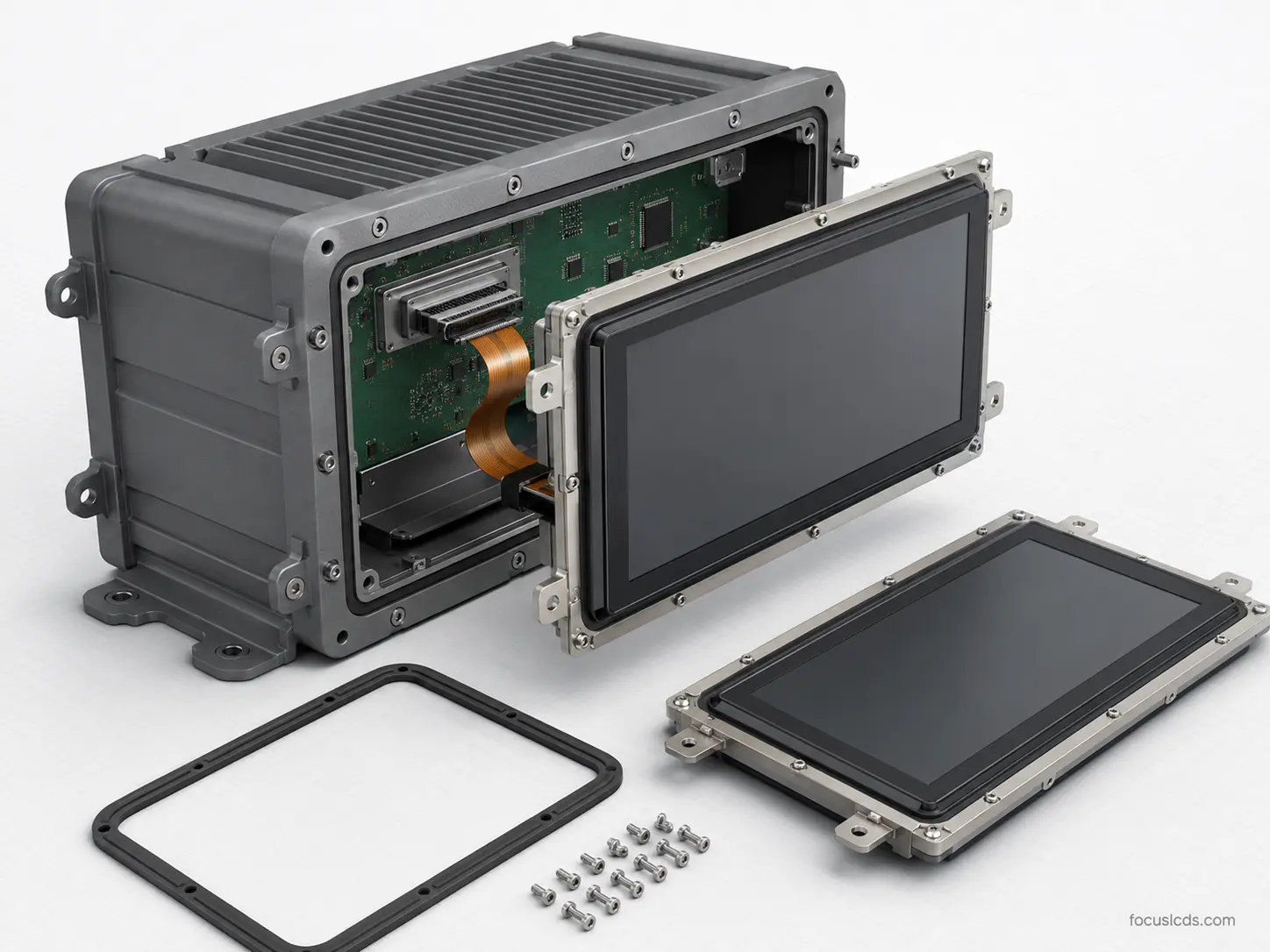
What is LCD field serviceability and replacement planning?
LCD field serviceability and replacement planning is the process of designing a display assembly so it can be inspected, accessed, removed, replaced, repaired, or upgraded without creating unnecessary risk to the LCD module, cover glass, touch panel, cables, gaskets, enclosure, or system validation status.
Why LCD field serviceability and replacement planning matters in OEM systems
LCD field serviceability and replacement planning affects uptime, service cost, repair quality, field reliability, spare part control, and long-term program support. A display may perform well at launch, but still create major lifecycle problems if it is difficult to replace, easy to damage during service, or dependent on uncontrolled materials.
In industrial, medical, defense, transportation, agricultural, food service, rugged, and long-lifecycle systems, field service can affect safety, compliance, operator usability, and system availability. For regulated OEM programs, a controlled serviceability strategy can reduce field risk, protect validation status, and support long-term program stability. Therefore, engineers should treat display serviceability as part of the product architecture, not as an afterthought after production release.
Focus LCDs manufactures and supplies standard and custom LCD modules for OEM integration. In addition, Focus LCDs works with engineering teams to review display stack-up, cable routing, connector access, cover glass, gasket interfaces, mounting features, replacement planning, and lifecycle requirements. However, final service procedures, system validation, regulatory certification, and compliance remain the responsibility of the OEM.
Key Takeaways for OEM Engineers
• LCD serviceability should be reviewed before enclosure tooling, cable routing, and production release.
• Display replacement planning affects uptime, field repair quality, spare part control, and validation status.
• Cables, connectors, gaskets, adhesives, fasteners, and cover glass can all be damaged during service.
• Long-lifecycle OEM programs should document approved replacement parts, materials, and revision controls.
• Final service procedures should be validated using production-intent parts and real field-service steps.
Why Serviceability Matters in LCD Integration
The display is often one of the most visible and frequently used parts of an OEM system. If the display fails, becomes unreadable, loses touch performance, or suffers damage, the entire machine may be difficult or unsafe to use.
Poor serviceability can create problems such as:
• Longer equipment downtime
• Damaged cables during replacement
• Broken cover glass during removal
• Lost gasket compression after service
• Incorrect replacement display installation
• Connector damage from repeated handling
• Service teams using non-approved parts
• Revalidation risk after uncontrolled changes
For long-life OEM programs, serviceability planning helps preserve system reliability beyond the first production build. It also supports field teams, quality teams, and program managers who need predictable replacement processes.
Design-for-service concepts are commonly treated as part of lifecycle planning. Siemens describes design for service as a lifecycle strategy focused on serviceability attributes such as reliability, configuration, and ergonomics. Engineers may reference Siemens Design for Service for broader serviceability context.
Common LCD Field Service Failure Modes
Service-related failures can appear as display, touch, optical, sealing, mechanical, or electrical problems.
| Failure Mode | Likely Service Cause | System Impact |
|---|---|---|
| Intermittent display operation | Flex cable damage or poor connector seating | Field reliability risk |
| Touch failure after replacement | Wrong stack-up, grounding issue, or cable mismatch | Poor operator input |
| Fogging after service | Gasket not replaced or compressed correctly | Reduced readability |
| Cover glass crack | Removal force, edge loading, or incorrect tool use | Mechanical failure |
| Cosmetic gap variation | Incorrect reassembly or missing spacer | Production and service inconsistency |
| Seal loss | Damaged gasket, adhesive, or enclosure seam | Ingress risk |
| Display mismatch | Uncontrolled replacement revision | Validation or compatibility risk |
Because these issues may look like LCD module failures, service procedures should be part of root cause review.
Display Replacement Strategy
Not every product needs the same replacement strategy. Some systems require full display assembly replacement, while others allow module-level or subassembly-level service.
| Replacement Strategy | Best Fit | Key Considerations |
|---|---|---|
| Complete display assembly replacement | Rugged, sealed, regulated, or fast-service systems | Higher assembly control, lower field handling risk |
| LCD module replacement | Serviceable enclosures with trained technicians | Cable access, gasket replacement, alignment control |
| Cover glass or touch panel replacement | Systems with replaceable front surfaces | Optical bonding, dust control, surface quality |
| Cable or connector replacement | Modular systems with accessible routing | Connector cycles, strain relief, approved cable lengths |
| Factory-only replacement | High-risk sealed or validated systems | Controlled process, lower field-service variation |
For safety-critical or regulated systems, complete display assembly replacement may reduce field handling risk. However, this decision depends on the enclosure design, validation plan, service model, and program lifecycle requirements.
When to Choose Field Replacement vs. Factory-Only Replacement
OEM teams should decide whether display replacement can happen in the field or should remain factory-controlled before the enclosure and service model are finalized.
Field replacement may be appropriate when:
• The display assembly is easy to access
• Cables and connectors can be inspected after service
• Gaskets or seals have clear replacement instructions
• The service team can use approved tools and parts
• Functional, touch, and sealing checks can be completed after replacement
• The system can tolerate controlled field-service variation
Factory-only replacement may be better when:
• The assembly is sealed, bonded, or difficult to rework
• Optical bonding, cover glass, or coating damage risk is high
• Gasket compression or ingress protection is difficult to verify in the field
• The system is regulated or safety-critical
• Replacement requires controlled cleaning, alignment, curing, or inspection
• Service errors could affect validation status or field reliability
This decision framework helps teams reduce field risk while preserving service access where it is practical.
Service Access and Mechanical Design
Service access should be reviewed before enclosure tooling. If technicians cannot reach fasteners, connectors, clips, or cables without stressing the display, field repair may create new failures.
Engineers should review:
• Fastener and tool access
• Connector access and inspection
• Cable release method
• Gasket replacement path
• Adhesive rework limits
• Display removal direction
• Cover glass protection
• Service part alignment
• Inspection after reassembly
Mechanical stack-up decisions are closely related to LCD Mounting and Mechanical Stack-Up Design for OEM Displays.
Cable and Connector Service Risks
Cables and connectors are common service risk points. A display may fail after replacement if the flex cable is bent too sharply, inserted unevenly, damaged by tools, or routed differently from the original build.
Engineers should check:
• Connector type and locking method
• Mating cycle limits
• Flex cable bend radius
• Cable strain relief
• Cable exit direction
• Service loop
• Connector inspection method
• Approved cable length
• Replacement cable control
Connector mating cycles, retention, and handling should match the service plan. Cable and connector reliability is discussed further in LCD Cable and Connector Design for Reliable OEM Integration.
Gaskets, Seals, and Service Replacement
Sealed display systems often require gasket or seal replacement after service. Reusing a compressed, damaged, or contaminated gasket can reduce sealing performance.
Engineers should review:
• Whether the gasket is reusable or single-use
• Replacement gasket part number
• Surface cleaning before reassembly
• Adhesive-backed seal handling
• Fastener torque after gasket replacement
• Visual inspection criteria
• Leak or ingress testing after service
• Approved service kits
Gasket and enclosure sealing design is discussed further in LCD Gasket and Enclosure Sealing Design for Rugged OEM Displays
Adhesives, Tapes, and Rework Limits
Some LCD assemblies use adhesives, tapes, or bonded layers for mounting, sealing, or optical performance. These materials can make field service more difficult if removal damages the display or leaves residue.
Engineers should review:
• Adhesive type
• Removal method
• Required tools
• Surface cleaning process
• Rework limits
• Replacement adhesive part number
• Cure or dwell time
• Alignment method
• Cosmetic inspection criteria
• Risk of cover glass or coating damage
If adhesive removal requires force near the cover glass or active area, the product may need a factory-only replacement process.
For electronic assemblies, IPC rework and repair guidance is often used to define controlled rework practices and repair decision-making. Engineers may reference the IPC-7711/7721 Rework, Modification and Repair of Electronic Assemblies overview when reviewing controlled repair practices for electronic assemblies.
Cover Glass, Touch, and Optical Stack Service Risks
Cover glass, touch panels, and optical bonding layers are sensitive to field handling. A service process that protects the electrical connection but damages the front stack can still create display failure.
Engineers should review:
• Cover glass edge protection
• Touch panel cable handling
• Optical bond line exposure
• Coating protection
• Dust control
• Fingerprint control
• Cleaning after service
• Alignment method
• Pressure during installation
• Final optical inspection
Front-stack design factors are discussed further in LCD Optical Bonding and Cover Glass Design for OEM Displays.
Cleaning After Service
Display replacement often requires cleaning before, during, or after reassembly. Cleaning steps must match the approved materials and validation assumptions.
Engineers should review:
• Approved cleaners
• Wipe method
• Residue control
• Edge seal protection
• Coating compatibility
• Touch test after cleaning
• Drying time
• Inspection lighting
• Field instructions
Cleaning and chemical compatibility are discussed further in LCD Cleaning and Chemical Resistance Design for OEM Displays.
Spare Parts and Revision Control
Spare parts planning is one of the most important parts of LCD serviceability. Field teams need the correct display revision, cable, gasket, adhesive, mounting hardware, and instructions.
Engineers should document:
• Approved display part number
• Display revision
• Cable part number
• Gasket part number
• Adhesive or tape part number
• Fastener specification
• Firmware or touch configuration requirements
• Approved alternates
• Replacement kit contents
• Change control process
For long-lifecycle OEM systems, replacement parts must remain compatible with the validated system. A small change to a display revision, cable length, cover glass, adhesive, or touch configuration may affect fit, performance, or compliance.
Lifecycle and Obsolescence Planning
Long-life OEM programs should plan for display availability, approved alternates, controlled supplier transitions, and service continuity. This matters because field replacement may continue long after the first production build.
Lifecycle planning should include:
• Expected service life
• Last-time-buy planning
• Approved alternates
• Compatibility testing
• Revision control
• Spare part storage conditions
• Replacement documentation
• Field retrofit strategy
• Validation impact review
• End-of-life communication
Manufacturing and operational risk reduction are also emphasized by NIST MEP, which supports manufacturers with operational improvement and risk-reduction resources. Engineers may reference the NIST Manufacturing Extension Partnership for broader manufacturing improvement and risk-reduction context.
How to Specify LCD Serviceability Requirements
Serviceability requirements should be defined before the display stack-up, enclosure, cable routing, and validation plan are finalized.
Engineers should specify:
• Who performs the service
• Where service occurs
• Required tools
• Allowed replacement level
• Maximum acceptable downtime
• Required service skill level
• Replacement kit contents
• Inspection steps
• Functional test steps
• Cleaning steps
• Revalidation requirements
• Documentation and traceability needs
Clear serviceability requirements help prevent late-stage redesign and reduce field variation.
LCD Field Serviceability Framework
A practical LCD field serviceability framework includes five areas:
• Mechanical service → access, fasteners, adhesives, brackets, replacement path
• Electrical service → cables, connectors, grounding, touch configuration, functional test
• Sealing service → gaskets, compression, ingress checks, cleaning, replacement kits
• Optical service → cover glass, coatings, dust control, alignment, inspection
• Lifecycle service → spare parts, approved alternates, revision control, service documentation
When teams review these areas together, they can reduce field-service risk and improve long-term display reliability.
Focus LCDs can help OEM teams review these display-specific serviceability factors early so replacement planning, cable access, gasket control, mechanical stack-up, and lifecycle requirements are aligned before release.
LCD Serviceability Risk Factors
| Risk Factor | Potential Impact | Design Review Action |
|---|---|---|
| Poor connector access | Cable damage or incomplete seating | Review access path and service tools |
| Reused gasket | Seal loss or ingress risk | Define gasket replacement requirements |
| Uncontrolled replacement display | Compatibility or validation risk | Document approved revisions and alternates |
| Adhesive removal damage | Broken cover glass or cosmetic defects | Define rework process or factory-only replacement |
| Missing service test | Faults remain after replacement | Define functional and touch test steps |
| Poor spare part control | Field variation or revalidation risk | Use approved service kits and revision control |
| Unclear cleaning instructions | Coating or seal damage | Define approved cleaners and wipe method |
This table helps teams connect service planning decisions to field reliability outcomes.
Design Review Checklist for LCD Serviceability
Before release, engineers should confirm:
• The display can be accessed without damaging cables, gaskets, or cover glass
• The replacement level is clearly defined
• Service tools, skill level, and inspection steps are documented
• Gaskets, adhesives, fasteners, and cables have approved replacement parts
• Connector seating and cable routing can be inspected after service
• Touch, optical, and functional tests are included in the service process
• Cleaning instructions match approved materials and validation assumptions
• Spare parts, revisions, alternates, and service kits are controlled
• Service changes are reviewed for validation and compliance impact
This checklist helps align engineering, quality, service, and program teams before production release.
Validation and Service Procedure Testing
Serviceability should be validated with production-intent parts and realistic service conditions. A replacement process that works on an engineering bench may not work in a field environment.
Validation planning may include:
• Display removal trial
• Replacement installation trial
• Cable and connector inspection
• Gasket replacement review
• Adhesive rework trial
• Cleaning process review
• Functional test after replacement
• Touch test after replacement
• Sealing inspection after service
• Documentation review with service teams
For rugged, regulated, or safety-critical systems, service validation should confirm that the display still meets system requirements after replacement.
Manufacturing and Service Kit Control
Serviceability also depends on how replacement parts are packaged, labeled, stored, and documented.
Service kit planning should include:
• Display module or assembly
• Gasket or seal
• Cable or flex assembly
• Adhesive or tape
• Fasteners
• Cleaning supplies
• Installation instructions
• Inspection checklist
• Functional test steps
• Revision traceability
A well-defined service kit can reduce field variation and help protect long-term reliability.
Common LCD Serviceability Mistakes
Engineers often encounter avoidable service issues during long-lifecycle programs.
Common mistakes include:
• Designing the display so it cannot be removed without cable damage
• Reusing gaskets that should be replaced
• Omitting connector inspection after service
• Using adhesives without defining rework limits
• Allowing uncontrolled substitute displays or cables
• Missing touch configuration requirements
• Skipping cleaning compatibility in service instructions
• Failing to test the service process before release
• Treating spare parts as separate from validation control
• Not documenting approved alternates
Although these issues may seem operational, they can create field failures, downtime, and compliance risk.
How to Debug LCD Issues After Field Service
Post-service failures can look like LCD, touch, cable, sealing, or software problems. A structured process helps identify the root cause.
- Confirm the replacement parts
Check display revision, cable part number, gasket, adhesive, fasteners, and service kit contents. - Inspect cable and connector seating
Look for incomplete insertion, damaged flex tails, bent contacts, weak locks, or changed routing. - Review mechanical reassembly
Check fastener torque, gasket placement, cover glass pressure, bracket fit, and enclosure alignment. - Check cleaning and handling effects
Inspect for residue, coating damage, dust, fingerprints, fluid ingress, or edge contamination. - Run functional and touch tests
Confirm display operation, backlight behavior, touch response, and any required configuration settings. - Compare against a known-good service build
Use a known-good assembly to separate replacement part issues from installation or system-level issues.
This process helps separate field-service problems from display module, firmware, enclosure, or original design issues.
Focus LCDs Engineering Approach
Focus LCDs manufactures and supplies standard and custom LCD modules and works with OEM engineering teams to align display serviceability, replacement planning, cable access, mechanical stack-up, gasket interfaces, and lifecycle requirements.
This includes support for TFT, monochrome graphic, character, and custom segment LCD technologies where relevant, along with custom LCD modules, cover glass planning, cable coordination, touch integration, optical stack-up review, gasket interface review, mounting features, service part planning, and display-related subassemblies where appropriate.
By reviewing serviceability and replacement requirements early, Focus LCDs helps OEM teams reduce integration risk, improve field support, and support reliable display operation in rugged, regulated, and long-lifecycle systems. This engineering-led display integration support is intended for OEM teams that require long-term program stability rather than lowest-cost sourcing.
Scope Boundary and Compliance Responsibility
Focus LCDs provides LCD modules and engineering guidance for integration. However, Focus LCDs does not control final OEM enclosure design, service procedures, field repair validation, regulatory certification, or compliance testing.
OEMs remain responsible for validating serviceability, replacement procedures, display performance, safety, and compliance within their complete system architecture.
Contact Focus LCDs
If you are developing a display system where field replacement, service access, spare part control, or long-term display support is critical, Focus LCDs can support display selection, custom module planning, and integration strategy.
Contact Focus LCDs: https://focuslcds.com/contact
FAQ: LCD Field Serviceability and Replacement Planning
What is LCD field serviceability?
LCD field serviceability is the ability to access, inspect, remove, replace, or repair a display assembly without causing unnecessary damage or reliability risk.
Why does LCD replacement planning matter for OEM systems?
Replacement planning affects downtime, field repair quality, spare part control, sealing performance, touch behavior, and long-term system reliability.
Should LCD gaskets be reused after service?
Not always. Some gaskets may lose compression, become contaminated, or require replacement after service. OEMs should define reuse or replacement rules.
Can display service affect validation status?
Yes. Changes to display revision, cable, gasket, adhesive, cover glass, or touch configuration may affect validated performance and should be reviewed.
What should be included in an LCD service kit?
A service kit may include the display assembly, gasket, cable, adhesive, fasteners, cleaning supplies, instructions, inspection checklist, and functional test steps.
When should LCD serviceability be reviewed?
LCD serviceability should be reviewed before enclosure tooling, cable routing, validation planning, and production release.
Who is responsible for final service validation?
The OEM is responsible for validating service procedures, replacement parts, safety, compliance, and final system performance.
Conclusion: Serviceability Supports Long-Term Display Reliability
LCD field serviceability and replacement planning directly affects uptime, repair quality, spare part control, field reliability, and long-term OEM program support.
By reviewing service access, cable handling, gasket replacement, adhesives, cover glass protection, spare parts, and revision control early, OEM teams can reduce field risk and support stable long-life programs.
In rugged and reliability-first systems, display serviceability is not only a maintenance concern. It is a core part of successful LCD integration.

