

LCD Mounting and Mechanical Stack-Up Design for OEM Displays
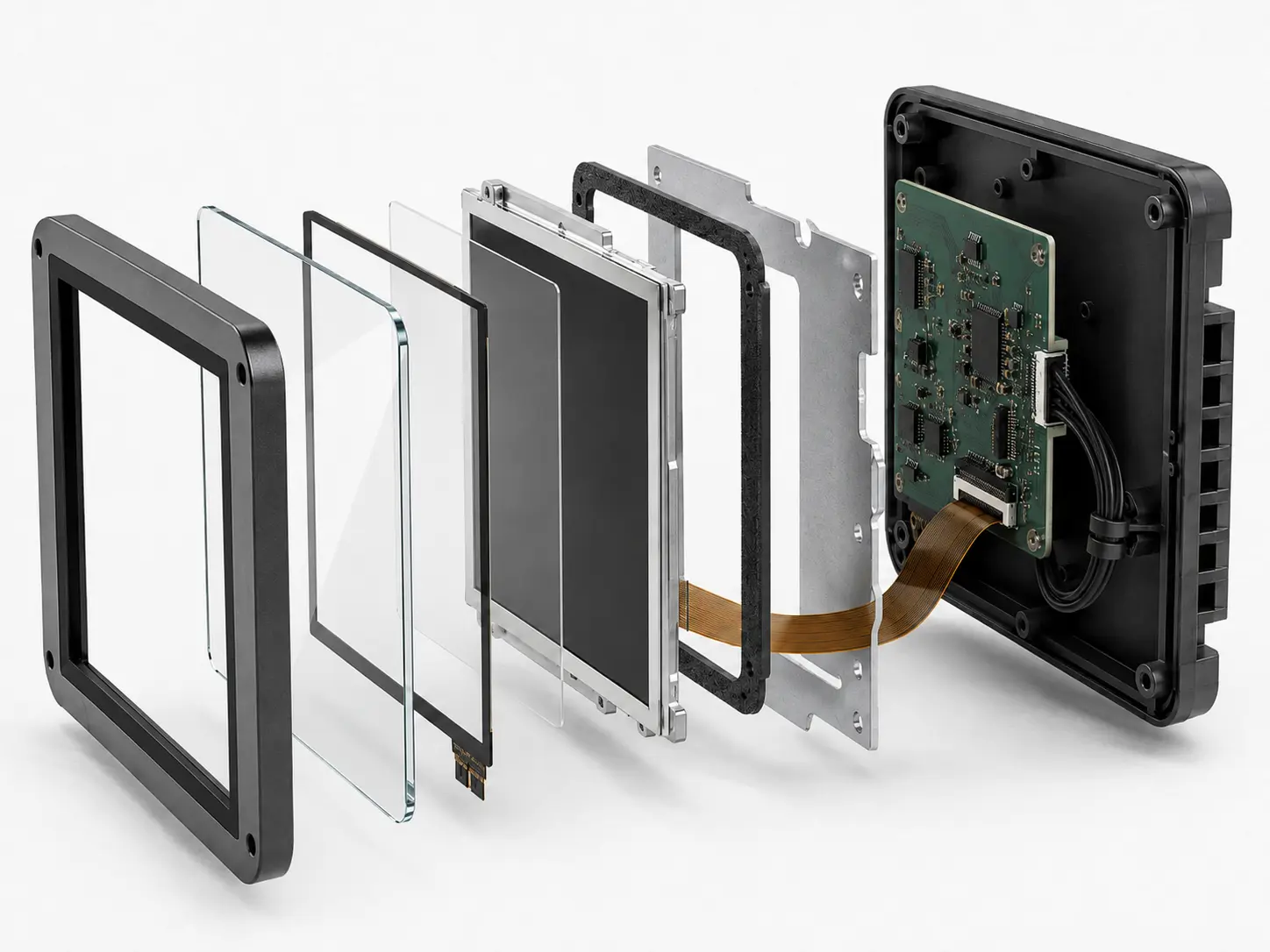
What is LCD mounting and mechanical stack-up design?
LCD mounting and mechanical stack-up design is the process of defining how the display module, cover glass, touch panel, gasket, cables, fasteners, adhesive layers, PCB, and enclosure fit together in an OEM system.
Why LCD mounting and mechanical stack-up design matters in OEM systems
LCD mounting and mechanical stack-up design affects display reliability, assembly consistency, optical performance, cable protection, vibration resistance, touch behavior, and long-term service life. A display may meet electrical and optical requirements, but still fail if the mechanical stack places stress on the glass, connector, flex cable, cover lens, or bonding layer.
In industrial, medical, defense, transportation, agricultural, food service, rugged, and long-lifecycle systems, poor mounting can create field failures, service issues, cosmetic defects, and validation delays. Therefore, engineers should treat LCD mounting and mechanical stack-up design as a system-level requirement, not as an enclosure detail.
This review should happen before enclosure tooling, validation planning, and production release. Once tooling is complete, small mechanical changes can affect fit, sealing, touch behavior, cable routing, optical quality, and validation status.
Focus LCDs manufactures and supplies standard and custom LCD modules for OEM integration. In addition, Focus LCDs works with engineering teams to review display stack-up, mounting strategy, cover glass, cable routing, gasket interfaces, touch integration, and lifecycle requirements. However, final enclosure design, system validation, regulatory certification, and compliance remain the responsibility of the OEM.
Key Takeaways for OEM Engineers
• LCD mounting affects glass stress, touch response, cable life, vibration behavior, and service access.
• Mechanical stack-up should be reviewed before enclosure tooling, PCB layout, and validation planning are finalized.
• Fasteners, adhesives, gaskets, clips, brackets, and enclosure features each create different risks.
• The final display assembly should be validated using production-intent parts, not only prototype fixtures.
• Long-life OEM programs should document stack-up assumptions, approved materials, and revision controls.
Why Mechanical Stack-Up Matters in LCD Integration
The display stack is more than the LCD module. It often includes the LCD glass, bezel, frame, adhesive layer, touch panel, cover glass, gasket, cables, mounting hardware, PCB, and enclosure.
Each layer affects the next. For example, enclosure pressure can transfer into the cover glass. A tight cable path can stress a flex connector. A fastener pattern can create uneven loading. A gasket can protect against ingress while also changing the pressure on the front stack.
Because these risks interact, engineers should review the full mechanical stack early in the design process. This review connects closely to LCD Design for Manufacturability in OEM Display Programs.
Common LCD Mounting Failure Modes
Mechanical mounting problems often appear as optical, touch, electrical, or reliability issues.
| Failure Mode | Likely Mechanical Cause | System Impact |
|---|---|---|
| Cover glass cracking | Edge loading, uneven compression, poor support | Mechanical failure |
| Display pressure marks | Enclosure force on active area | Optical defect |
| Intermittent display operation | Cable strain or connector movement | Field reliability risk |
| Touch instability | Cover glass stress, enclosure pressure, grounding issue | Poor user input |
| Image distortion | Stack-up pressure or frame stress | Reduced display quality |
| Buzzing or rattling | Loose bracket, weak retention, vibration | Poor field performance |
| Cosmetic gap variation | Tolerance stack-up or assembly variation | Production inconsistency |
Since these symptoms may look like LCD, touch, cable, or optical problems, engineers should evaluate mechanical stack-up during root cause analysis.
Core Elements of LCD Mechanical Stack-Up
A complete display stack-up review should include all parts that touch, support, compress, route, or protect the display.
Engineers should review:
• LCD module outline
• Active area and viewing area
• Cover glass thickness
• Touch panel position
• Adhesive or bonding layer
• Gasket thickness and compression
• Enclosure lip geometry
• Mounting brackets
• Fasteners or clips
• Cable exit path
• PCB location
• Service access
A small change in one layer can affect the whole display assembly. Therefore, the stack-up should be treated as a controlled design item.
Mounting Methods for LCD Modules
Different mounting methods suit different enclosure, service, and reliability needs. The correct method depends on the display size, product environment, service plan, and mechanical load path.
| Mounting Method | Best Fit | Key Design Considerations |
|---|---|---|
| Bracket mounting | Rugged systems, larger displays, serviceable assemblies | Fastener spacing, stiffness, vibration, service access |
| Adhesive mounting | Thin assemblies, sealed fronts, clean industrial designs | Surface prep, bond area, material compatibility, rework limits |
| Clip or snap-fit mounting | Lower-load assemblies, quick production, plastic housings | Clip fatigue, tolerance control, service damage |
| Bezel compression | Front-mounted displays, gasketed systems, sealed enclosures | Compression control, glass stress, active area clearance |
| PCB-supported mounting | Small modules, compact embedded products | PCB stiffness, connector stress, board deflection |
A mounting method should protect the display without creating uneven pressure or service risk.
Fasteners, Inserts, and Bracket Design
Fasteners and brackets help control position, stiffness, and service access. However, they can also create stress if they are placed too close to glass edges, tightened unevenly, or used with weak enclosure features.
Engineers should check:
• Fastener size
• Fastener spacing
• Torque limits
• Thread engagement
• Insert type
• Bracket stiffness
• Stand-off height
• Washer use
• Service access
• Vibration resistance
For fastener selection and mechanical attachment context, engineers may reference PEM design engineers fastener guide.
In vibration-prone systems, bolted joints may loosen if preload is not maintained. Engineers may also reference Nord-Lock washer user guide when reviewing vibration-resistant bolted joints.
Adhesive Mounting and Tape Design
Adhesive mounting can help reduce hardware, seal front surfaces, support thin assemblies, and improve cosmetic appearance. However, adhesive designs require careful review of load, temperature, surface preparation, and service needs.
Engineers should review:
• Bond area
• Adhesive thickness
• Surface energy
• Surface cleaning
• Peel and shear loading
• Temperature range
• Humidity exposure
• Rework needs
• Creep over time
• Material compatibility
Adhesive mounting should not place stress on the active display area or create hard-to-control rework risk. Engineers may reference the 3M VHB Tape Design Guide when reviewing adhesive bonding, surface preparation, and joint design.
Gasket Compression and Display Loading
Gaskets often sit between the display stack and enclosure. They can protect against dust, moisture, vibration, and cosmetic gaps, but they can also create stress if the compression path is not controlled.
Engineers should review:
• Gasket thickness
• Compression percentage
• Gasket width
• Closure force
• Active area clearance
• Cover glass edge clearance
• Fastener spacing
• Enclosure flatness
• Tolerance stack-up
• Long-term compression set
Too little compression can reduce sealing. Too much compression can cause pressure marks, touch issues, cover glass stress, or optical distortion.
Gasket design is discussed further in LCD Gasket and Enclosure Sealing Design for Rugged OEM Displays.
Cover Glass and Touch Panel Stack-Up
Cover glass and touch panel design affect the load path, touch response, durability, and optical performance of the display assembly.
Engineers should review:
• Cover glass thickness
• Edge finish
• Ink border
• Touch sensor location
• Adhesive or bonding method
• Coating selection
• Enclosure contact points
• Gasket location
• Service handling
• Cleaning exposure
If the cover glass is too thin for the load path, it may crack or flex. Excess thickness can also affect touch performance and may require additional tuning. Uneven enclosure pressure may cause optical distortion or touch instability.
Related front-stack design factors are discussed in LCD Optical Bonding and Cover Glass Design for OEM Displays.
Cable Routing in the Mechanical Stack
Cable routing should be part of the mechanical stack-up review, not a separate late-stage task. Display cables often pass through tight spaces near brackets, gaskets, hinges, PCBs, or enclosure walls.
Engineers should check:
• Cable bend radius
• Connector access
• Strain relief
• Routing clearance
• Cable exit direction
• Contact with sharp edges
• Movement during service
• Enclosure pinch points
• Final cable length
• Approved alternates
A cable may pass electrical testing but fail later if the final enclosure path bends, pinches, or pulls it. These risks are discussed further in LCD Cable and Connector Design for Reliable OEM Integration.
Tolerance Stack-Up and Assembly Variation
Tolerance stack-up can turn a stable prototype into an inconsistent production build. Small variations in enclosure parts, gasket thickness, cover glass position, adhesive thickness, bracket flatness, and fastener torque can combine into a larger mechanical problem.
Teams should review:
• Worst-case clearances
• Part tolerance ranges
• Gasket compression range
• Bracket flatness
• Fastener torque variation
• Adhesive thickness range
• Display module tolerance
• Enclosure material movement
• Assembly sequence
• Inspection points
If the design only works at nominal dimensions, it may fail during production. Therefore, stack-up review should include minimum and maximum material conditions.
Vibration, Shock, and Rugged Reliability
Rugged systems require mounting designs that protect the display from vibration, shock, and repeated handling. A mechanically weak stack-up can cause cracked glass, loose fasteners, cable fatigue, connector movement, or display rattle.
Engineers should review:
• Natural frequency risk
• Bracket stiffness
• Fastener retention
• Cable strain relief
• Gasket damping
• Glass edge support
• Enclosure rigidity
• Service loads
• Shipping vibration
• Field vibration
Mechanical reliability is closely related to LCD Glass Selection for Vibration in Rugged OEM Systems and Rugged LCD Design for Harsh and Safety-Critical Applications.
Thermal and Material Expansion Effects
Thermal change can affect mechanical stack-up because different materials expand and contract at different rates. Glass, plastic, metal, adhesive, foam, and PCB materials may move differently as temperature changes.
Common thermal risks include:
• Cover glass stress
• Adhesive creep
• Gasket compression change
• Bracket movement
• Cable strain
• PCB bowing
• Seal loss
• Touch drift
• Optical distortion
In sealed or high-brightness systems, heat from the display and electronics can increase stack-up stress. Thermal planning is discussed further in LCD Thermal Modeling in Enclosures for OEM Reliability.
Serviceability and Field Replacement
Some OEM systems require field service or display replacement. Mechanical stack-up should support service without damaging the display, gasket, cable, connector, cover glass, or enclosure.
Engineers should review:
• Access to fasteners
• Cable release method
• Gasket replacement process
• Adhesive rework limits
• Connector mating cycles
• Tool clearance
• Replacement part control
• Inspection after service
• Field instructions
• Approved spare parts
A design that is easy to assemble at the factory may still be difficult to service in the field. Therefore, service access should be reviewed early when the product requires long-term support.
How to Design an LCD Mechanical Stack-Up Before Enclosure Tooling
Before enclosure tooling begins, engineers should confirm the complete display stack and mechanical load path. This review helps reduce risk before tooling, validation, and production release.
Key tooling-readiness checks include:
• Confirm the LCD module outline, active area, and viewing area
• Define cover glass, touch panel, adhesive, gasket, and enclosure interfaces
• Check cable exit direction, bend radius, and connector access
• Review fastener spacing, bracket support, and enclosure flatness
• Confirm gasket compression and active area clearance
• Review tolerance stack-up at minimum and maximum material conditions
• Validate service access and replacement steps
• Document approved materials, alternates, and revision controls
Focus LCDs can support long-lifecycle display programs where mechanical changes may affect validation status, service planning, and production consistency.
LCD Mounting and Mechanical Stack-Up Framework
A practical LCD mounting and mechanical stack-up framework includes five areas:
• Mechanical design → mounting, brackets, fasteners, adhesives, tolerance stack-up
• Optical design → cover glass pressure, active area clearance, distortion control
• Electrical design → cable routing, connector strain, grounding, PCB support
• Environmental design → vibration, shock, heat, moisture, cleaning exposure
• Lifecycle design → service access, approved materials, revision control, spare parts
When teams review these areas together, they can reduce mechanical risk and improve long-term display reliability.
Focus LCDs can help OEM teams review these display-specific mechanical factors early so mounting, cover glass, gasket, cable routing, and lifecycle requirements are aligned before release.
LCD Mounting and Stack-Up Risk Factors
| Risk Factor | Potential Impact | Design Review Action |
|---|---|---|
| Uneven enclosure pressure | Optical distortion or touch instability | Review gasket path, fastener spacing, and cover glass support |
| Tight cable routing | Cable fatigue or connector strain | Define bend radius, service loop, and strain relief |
| Poor fastener control | Loose bracket or glass stress | Define torque, insert type, and retention method |
| Adhesive creep | Position shift or seal loss | Review adhesive type, surface prep, temperature, and load |
| Weak bracket stiffness | Rattle, vibration failure, or display movement | Review bracket geometry and support points |
| Poor tolerance stack-up | Production variation or assembly stress | Analyze worst-case dimensions and inspection points |
| Unplanned service access | Field damage or rework difficulty | Define service sequence and replacement controls |
This table helps engineers connect mechanical symptoms to design decisions before validation begins.
Design Review Checklist for LCD Mechanical Stack-Up
Before releasing an LCD mechanical design, engineers should confirm:
• The display stack does not place pressure on the active area
• Cover glass, touch panel, gasket, adhesive, and enclosure parts align correctly
• Cable routing supports bend radius, strain relief, and connector access
• Fasteners, brackets, clips, or adhesive methods support vibration and service needs
• Tolerance stack-up has been reviewed across worst-case dimensions
• Thermal expansion does not create glass, gasket, cable, or adhesive stress
• Service access and replacement steps are practical for the final product
• Validation uses final display, enclosure, gasket, cable, adhesive, and mounting parts
• Approved materials, alternates, and revision controls are documented
This checklist consolidates the most critical mechanical review items before production release.
Validation and Test Planning
Mechanical stack-up should be validated with production-intent parts. Prototype shortcuts can hide real mounting risks.
Validation planning may include:
• Fit check with final enclosure parts
• Fastener torque review
• Gasket compression review
• Cable routing inspection
• Vibration testing
• Shock testing
• Thermal cycling
• Touch performance testing
• Optical inspection
• Service replacement trial
For rugged systems, teams should test the complete display assembly under real operating conditions, not only the display module by itself.
Manufacturing and Assembly Control
Mechanical design must support repeatable production. A strong stack-up can still fail if assembly teams install the display inconsistently.
Manufacturing teams should review:
• Assembly sequence
• Fastener torque process
• Adhesive placement
• Gasket placement
• Cable routing instructions
• Connector seating inspection
• Bracket alignment
• Rework limits
• Handling instructions
• Final inspection criteria
Clear work instructions help reduce assembly variation and protect long-term display reliability.
Lifecycle and Revision Control
LCD mounting and mechanical stack-up design also require lifecycle planning. Material choices, fasteners, adhesives, gaskets, brackets, and cable assemblies should be documented and controlled.
For long-life OEM programs, changes to any mechanical stack-up item may affect fit, sealing, touch behavior, optical quality, or validation status. Because of this, engineers should review BOM stability, approved alternates, supplier transitions, and revision control before production release.
Common LCD Mounting and Stack-Up Mistakes
Engineers often encounter avoidable mechanical issues during display integration.
Common mistakes include:
• Treating mounting as an enclosure-only task
• Pressing the enclosure against the active display area
• Ignoring tolerance stack-up
• Routing cables after the mechanical design is locked
• Using prototype adhesive or gasket materials during validation
• Skipping service access review
• Applying uneven fastener torque
• Changing bracket or gasket suppliers without revalidation
• Failing to inspect connector seating after assembly
• Overlooking thermal expansion effects
Although these issues may seem small during development, they can create field failures, production variation, and late-stage redesign.
How to Debug LCD Mechanical Stack-Up Issues
Mechanical stack-up issues can look like optical, touch, cable, or LCD module failures. A structured process helps narrow the root cause.
- Identify the symptom
Check whether the issue appears as pressure marks, cracks, touch faults, cable strain, rattle, or display movement. - Inspect the stack-up path
Review cover glass, gasket, bracket, fasteners, adhesive, cable routing, and enclosure contact points. - Check assembly variation
Compare several units to see whether the issue changes with torque, gasket placement, cable path, or enclosure fit. - Compare with a known-good build
Use a known-good display assembly to separate LCD module issues from mechanical integration problems. - Test under real conditions
Repeat testing under vibration, thermal cycling, service handling, and full system operation. - Confirm the corrective action
Validate the fix using production-intent parts, final assembly steps, and documented inspection criteria.
This process helps separate mounting and stack-up problems from LCD panel, touch controller, cable, firmware, or enclosure issues.
Focus LCDs Engineering Approach
Focus LCDs manufactures and supplies standard and custom LCD modules and works with OEM engineering teams to align mounting, mechanical stack-up, cover glass, cable routing, gasket interfaces, and lifecycle requirements.
This includes support for custom LCD modules, cover glass planning, cable coordination, touch integration, optical stack-up review, mounting features, mechanical fit, and display-related subassemblies where appropriate.
By reviewing mounting and mechanical stack-up requirements early, Focus LCDs helps OEM teams reduce integration risk, improve assembly consistency, and support reliable display operation in rugged, regulated, and long-lifecycle systems. This engineering-led display integration support is intended for OEM teams that require long-term program stability rather than lowest-cost sourcing.
Scope Boundary and Compliance Responsibility
Focus LCDs provides LCD modules and engineering guidance for integration. However, Focus LCDs does not control final OEM enclosure design, mounting validation, service process validation, regulatory certification, or compliance testing.
OEMs remain responsible for validating display performance, safety, serviceability, and compliance within their complete system architecture.
Contact Focus LCDs
If you are developing a display system where mounting, mechanical stack-up, cover glass stress, cable routing, or rugged reliability is critical, Focus LCDs can support display selection, custom module planning, and integration strategy.
Contact Focus LCDs: https://focuslcds.com/contact
FAQ: LCD Mounting and Mechanical Stack-Up Design
What is LCD mounting and mechanical stack-up design?
LCD mounting and mechanical stack-up design defines how the LCD module, cover glass, touch panel, gasket, cables, fasteners, PCB, and enclosure fit together in the final system.
Why does LCD mounting affect reliability?
LCD mounting affects glass stress, cable strain, connector stability, touch response, optical performance, vibration behavior, and long-term service life.
Can enclosure pressure damage an LCD?
Yes. Uneven enclosure pressure can create pressure marks, optical distortion, touch issues, cracked cover glass, or stress on the LCD glass.
What should engineers review in an LCD mechanical stack-up?
Engineers should review cover glass, gasket compression, fasteners, brackets, adhesive layers, cable routing, enclosure fit, service access, and tolerance stack-up.
Why is tolerance stack-up important in LCD integration?
Tolerance stack-up affects whether the display fits consistently across production builds. Poor tolerance control can create stress, gaps, distortion, or assembly variation.
When should LCD mounting design be validated?
LCD mounting design should be validated before production release using the final display, enclosure, gasket, cable routing, fasteners, adhesive materials, and assembly process.
Conclusion: Mechanical Stack-Up Protects Display Reliability
LCD mounting and mechanical stack-up design directly affects durability, optical quality, touch performance, serviceability, and long-term reliability.
By reviewing mounting method, fasteners, adhesives, gasket compression, cable routing, cover glass stress, tolerance stack-up, and lifecycle needs early, OEM teams can reduce validation delays and prevent field failures.
In rugged and reliability-first systems, mechanical stack-up is not only a packaging detail. It is a core part of successful LCD integration.

